Check-in runs itself. Follow-through finally happens.
ClassCheckpoint checks your students in and out, learns each student's rhythm, and every morning sends you one short email that says exactly who needs attention before a family drifts away.
The actual product, Daniel taps in, answers one question, gets his star
Run the classroom from one screen
While class runs, the dashboard is your room at a glance: who's signed in, how each student rated their homework on the way in, and how long they've been at the center, with timers that flag anyone past their expected session.
That's the difference between supervising a room and actually teaching it: the student who tapped "too hard" gets you at their shoulder first, the one cruising on "too easy" gets stretched, and nobody quietly sits for two hours because the front desk lost track.
- ✓ Live roster with session timers and homework ratings
- ✓ Add a note to any student mid-session; it sticks to their record
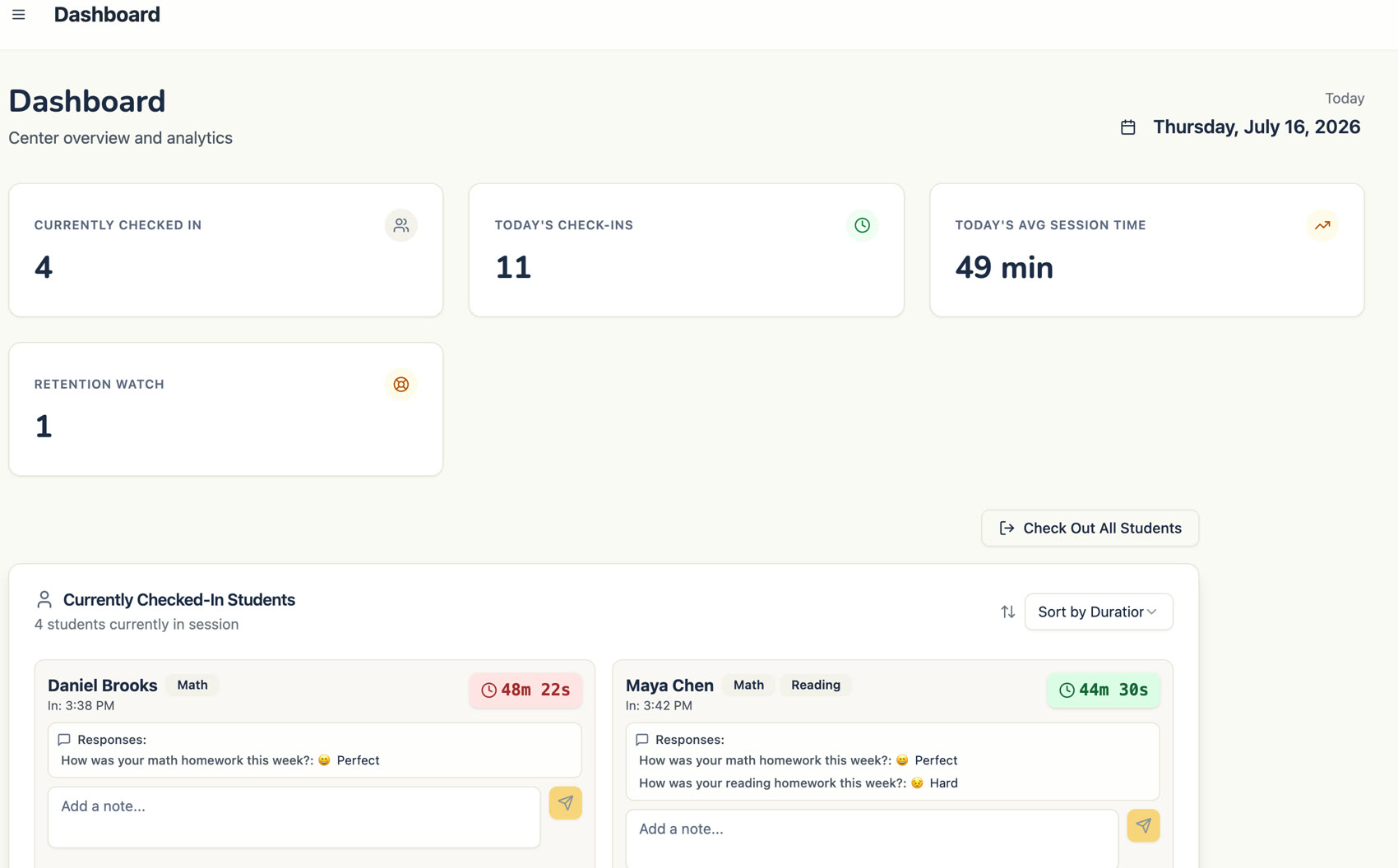
The room right now, timers, homework ratings, notes
After close, the data starts teaching
Every tap at the kiosk becomes signal. ClassCheckpoint turns a month of check-ins into four things: how each student is trending, what to adjust, which parent to call today, and how the whole center is trending.
Each student's trajectory through time
Every check-in answer lands on the student's timeline, so you see the trajectory, not the anecdote. This is the chart a parent conversation should start from.
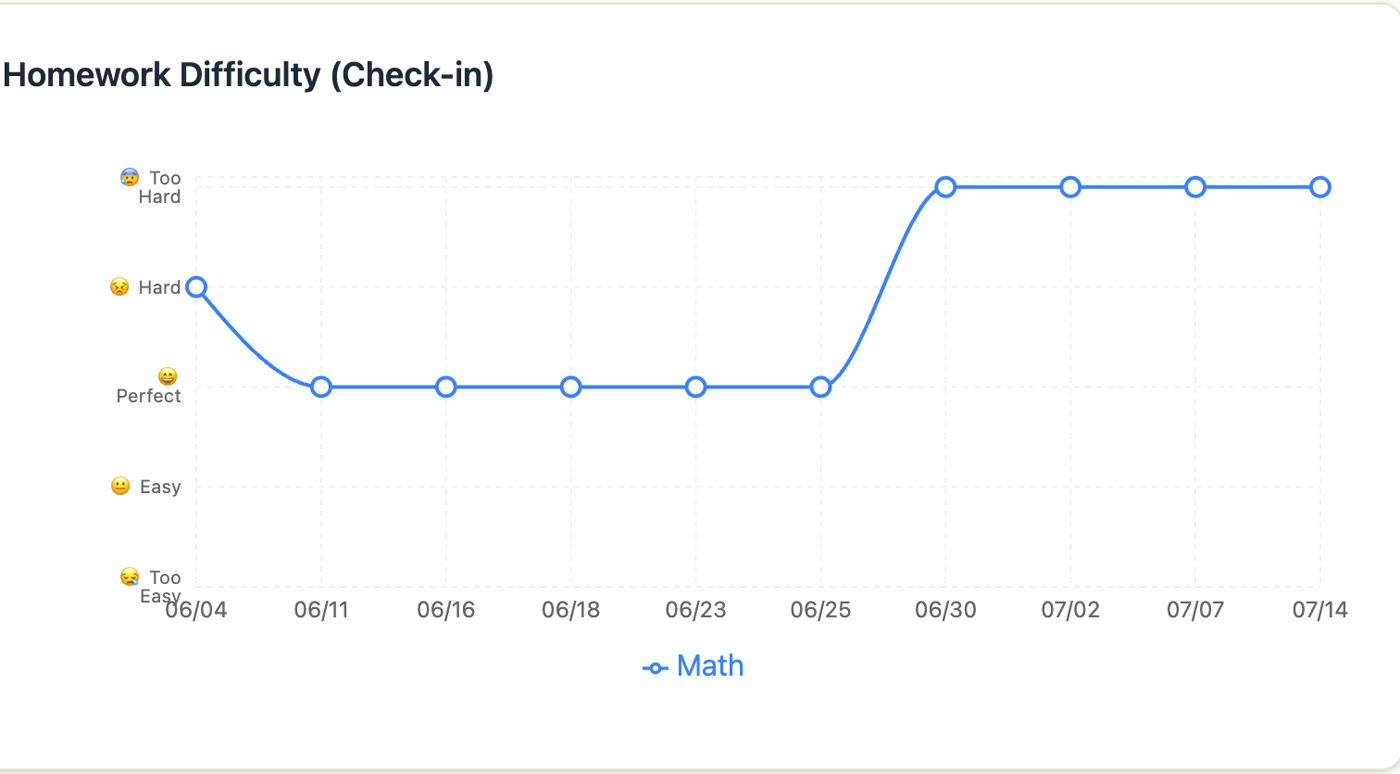
Marcus rated homework "Perfect" all June. Then "Too Hard," four sessions straight
Tailor the instruction, not just the attendance
A "too hard" streak means check the level before frustration becomes a cancellation. A "too easy" streak means advance the student, and advancing students is why parents stay. Each signal becomes a task with the reason written out, so tomorrow's class starts with a plan.
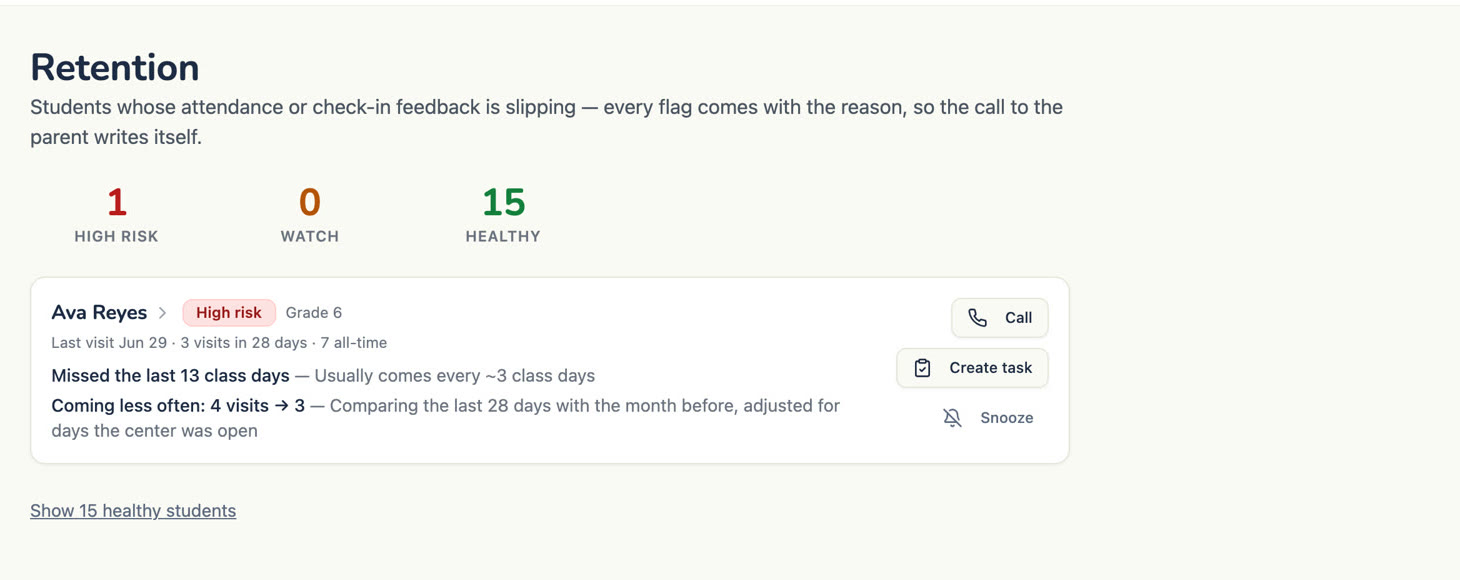
Attendance slipping gets flagged the same way, with the reason
The call actually gets made
You don't have to remember to check any of this. Overnight, one AI-written email reads the trends for you. It's in your inbox the next morning: who needs attention, why, and what got done yesterday.
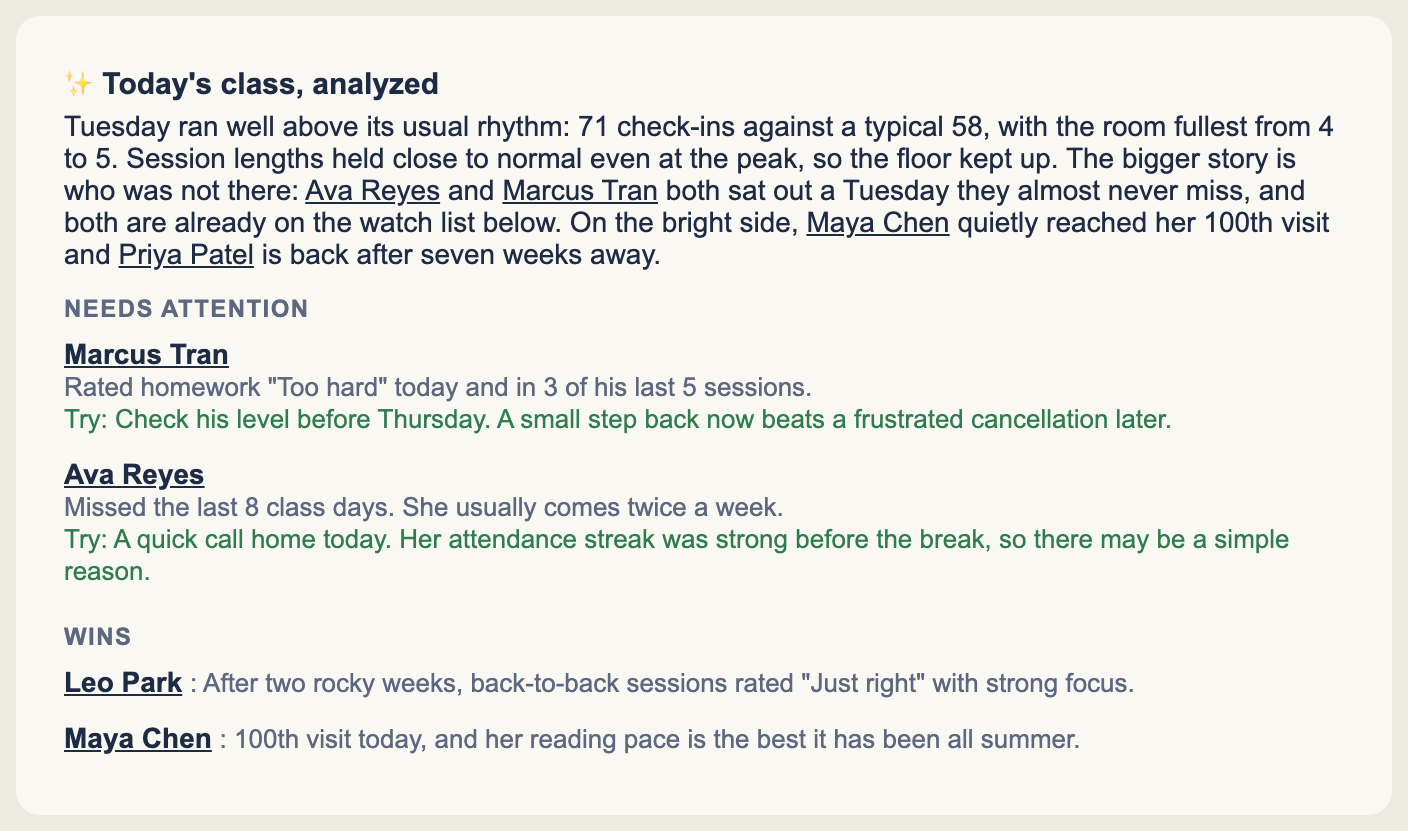
The actual email, every morning. Names link straight to the student's record.
When your students actually come
Zoom out and the same data shows the whole center: your real rush hours, attendance week over week, and how this month compares to last.
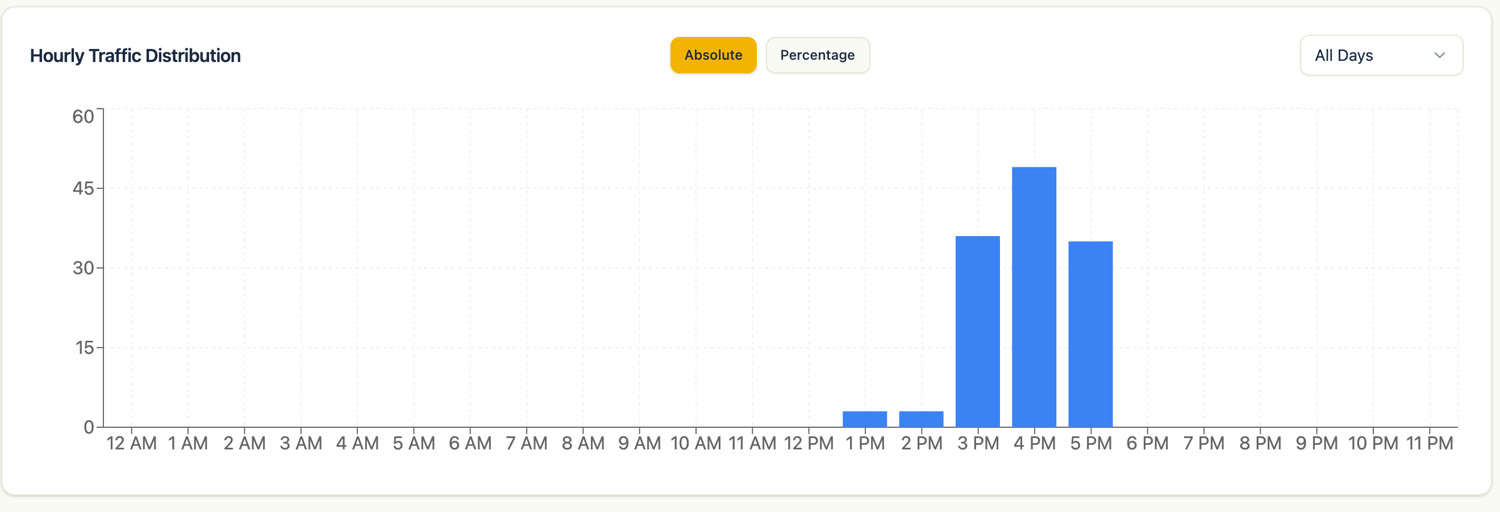
Your real rush hours, from real check-ins
Built inside real learning centers
ClassCheckpoint wasn't designed at a software company. It was built inside our family's learning centers, because the paper sign-in sheet and the "I meant to call them" list weren't working. It has run our centers' front desks every day since, and now it can run yours.
“We’ve relied on ClassCheckpoint in our center every day for the past year, and it’s been nothing short of vital for my daily lesson planning. What really sets it apart is the exact insight it gives me into how my students are progressing. If someone is struggling, I don’t have to wait to find out. I can make changes on the fly and step in with guidance before that child gets frustrated or wants to quit. It’s an essential tool that genuinely supports both the instructor and the student. Highly recommended!”
 Hester H. · Castro Valley Central Instructor
One plan. Everything included. No per-student fees.
Comes with a 30-day money-back guarantee: if it hasn't earned its keep, full refund and your data leaves with you.
ClassCheckpoint
$149/month
or $1,490/year (two months free). Kiosk check-in and check-out, check-in questions, the retention watch, analytics, and the morning email that says who needs attention.
Get started| What you get | Included |
|---|---|
| Kiosk check-in and check-out | ✓ |
| Live dashboard with session timers | ✓ |
| Student roster, profiles, and history | ✓ |
| Attendance records and export | ✓ |
| One-drag roster import | ✓ |
| Team logins and roles | ✓ |
| Check-in questions (mood, homework difficulty) | ✓ |
| Morning email digest: who needs attention, and why | ✓ |
| Retention watch list with reasons | ✓ |
| Analytics and trend charts | ✓ |
| AI daily analysis | ✓ |
| Student follow-through tasks | ✓ |
| 30-day money-back guarantee | ✓ |
Running more than one center? Each additional center is $99/month. For perspective: one student who slips away unnoticed costs a center $3,000 or more. A year of ClassCheckpoint costs $1,490, and catching that student before they slip is its whole job.
Fair questions
What do we need to run it?
Any device with a browser for the front desk: a tablet, a desktop, or any touchscreen. Nothing to install.
How long does setup take?
It's plug and play. Export your roster as a CSV, drag it in, open the check-in screen on your front-desk device, and check-ins start the same day. The retention signals get smarter over the following weeks as visit history builds.
Whose data is it?
Yours, unambiguously. Every record is exportable at any time, and if you leave, it leaves with you.
What if it doesn't work for us?
Every plan carries a 30-day money-back guarantee. If ClassCheckpoint hasn't earned its keep in your first 30 days, say so. You get a full refund and your data exports with you.